Slide 4 of 13 from Internal Workshop PowerPoint Template
Introduction to the Topic – Internal Workshop Presentation Template
Introduction to the Topic Slide
- Text Layout
- List Blocks
- Context Slide
- 16:9
- 100% Editable
The Introduction to the Topic slide from the Internal Workshop PowerPoint Template offers a clear, organized layout ideal for educational workshops and training sessions. This slide template features editable shapes and distinct text blocks to highlight key points such as objectives and main ideas, supporting effective communication in corporate presentations and slide decks.
What’s on This Slide
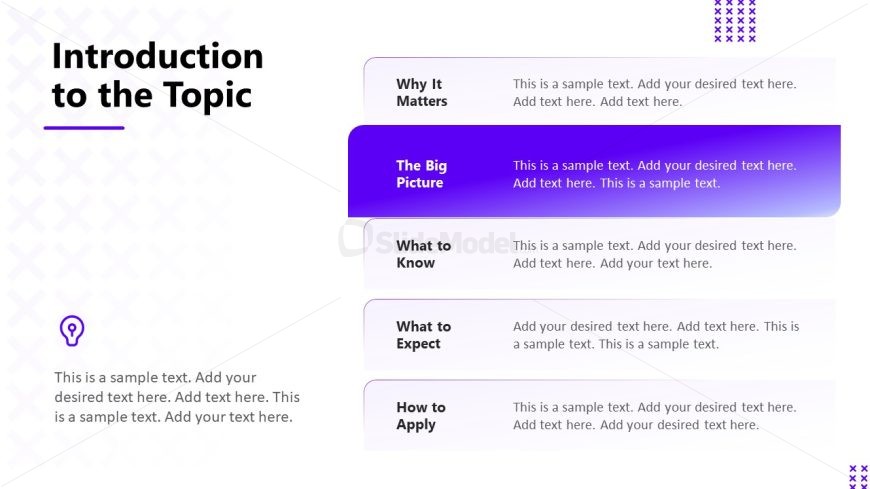
The layout features a vertical arrangement of text sections on the left side, with a prominent title at the top. The title 'Introduction to the Topic' is centered and bold. Below, there are five labeled sections: 'Why It Matters,' 'The Big Picture,' 'What to Know,' 'What to Expect,' and 'How to Apply.' Each section has a text placeholder aligned to the left, with the 'The Big Picture' section highlighted in a purple background, creating a visual hierarchy. The background is light, with a subtle pattern of overlapping shapes, enhancing the overall design. Each section has space for additional text.
How to Use It
This layout serves as a structured overview for introducing a topic in a workshop setting. It effectively organizes key points into distinct sections, making it suitable for outlining objectives or main ideas. This slide fits well after an agenda slide, guiding participants into the main content. It is ideal for scenarios where clarity and organization are essential, such as educational workshops or training sessions. The highlighted section can emphasize critical information, making it useful for presentations that require focus on specific themes.
Text Placeholders & Capacity
Keep your copy within these limits so it fits without resizing. Node body slots can hold roughly 30-40 words each.
| Placeholder | Count | Max characters (approx.) |
|---|---|---|
| Slide title | 1 | 30 |
| Item heading | 5 | 20 |
| Item body | 5 | 150 |
Slide Keywords
Download unlimited PowerPoint templates, charts and graphics for your presentations with our annual plan.
DOWNLOADReturn to Internal Workshop PowerPoint Template.