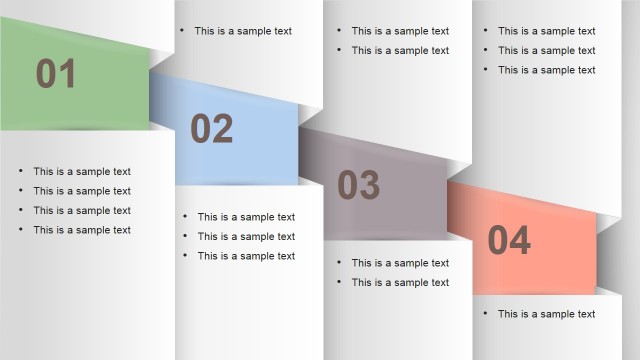
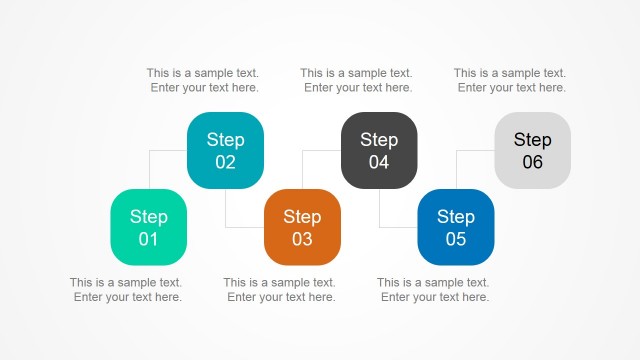
Flat Numbered Vertical Banner Template for PowerPoint – Perk up your audience’s interest with this simple and professional PowerPoint template design. This template is great for human resources related presentations. The design is similar to the time card pockets used in punch clocks. Most companies still see the value and reliability of this device and still use it as their means of calculating payroll. This familiar illustration is perfect for conducting presentations regarding work hours, overtime, method for computing salary, employee performance and more. The template is also reminiscent to scorecards. Each numbered card can represent different levels of employee performance. And then, the text below can be used as a space for enumerating the guidelines for each level.
The workforce is one of the most frequent types of audience for a business presentation. They are generally defined as a group of professionals employed in a business organization. The term usually refers to individuals in a company’s production or service line. This part of the company usually has the highest number of people employed compared to other departments. Several industries employ workforce management as the unit that identifies the right person for the company’s human resource needs. It’s the same department that assigns employees to other applicable positions throughout the employee’s development in the organization. This conventional approach continues to evolve into more comprehensive and integrated approach.
The development and innovations in workforce management give rise to the need for more business presentations. It’s the most effective way of large scale dissemination of important changes in the department. Workforce management ideally supplies a set of performance guidelines to support all levels of management and non-management departments in the company. This expectation necessitates the unit to regularly conduct seminars and training across the board. It is also responsible for keeping the required skills of each employee updated. In addition, they monitor the performance of the employees and make sure that everyone is at least meeting company expectations.
What’s inside this template
Example presentation scenarios
- An HR manager can use the four numbered banner cards to explain performance levels and place the criteria for each level in the editable bullet panels.
- A corporate trainer can introduce four training modules with the overview slide, then use the highlighted step slides to focus attention on one module at a time.
- An operations lead can present a four-phase procedure by assigning each vertical banner to a phase and using the active-card variants to discuss ownership and actions.
- A business consultant can compare four scorecard categories by replacing the sample text with evaluation criteria and using the color-highlighted cards to guide discussion.
Features
- 100% editable presentation template
- Compatible with Microsoft PowerPoint and Google Slides
- 16:9 aspect ratio slides
- Scalable vector shapes, icons and illustrations
- AI-Ready for Microsoft Copilot and Claude
- Instant access and download
Frequently asked questions
Q: How should I present the four numbered banners so the audience follows the sequence?
A: Start with the overview slide to name all four parts before adding detail. Then move through the highlighted slides in order, treating each active banner as the current discussion point. Keep the bullet panels short, with one idea per bullet, so the audience sees both the full structure and the current focus.
Q: Who is this template best suited for in a business presentation?
A: This template fits HR managers, trainers, operations leads, and consultants who need to explain four levels, steps, or categories without building a dense process diagram. It works well for workforce guidelines, scorecards, procedure briefings, and training modules because each numbered card gives a clear place for rules, criteria, or actions.
Q: Why use vertical banner cards instead of a standard bullet list?
A: The pocket-style vertical cards make the four-part structure visible before the audience reads the text. The highlighted-card slides create a simple spotlight effect, which reduces split attention and helps the presenter pace the explanation. The design also suggests time cards or scorecards, a useful metaphor for HR and performance topics.


Flat Numbered Vertical Banner Template for PowerPoint
5-slide presentation template with four numbered vertical banners for process steps and HR scorecards
Flat Numbered Vertical Banner Template for PowerPoint is a 5-slide diagram template with four vertical numbered banner cards. It includes a four-step overview, highlighted active-card variants, and bullet list panels for process steps, scorecards, or workforce guidelines in Microsoft PowerPoint and Google Slides.
- Category
- Diagrams
- Rating

 Loading...
- Aspect ratio
- 16:9, 4:3
- Item ID
- 6737-02
- Colors
 Microsoft PowerPoint
 Microsoft Copilot
 Claude for PowerPoint
Other formats supported
Subscribe today and get immediate
access to download our PowerPoint templates.