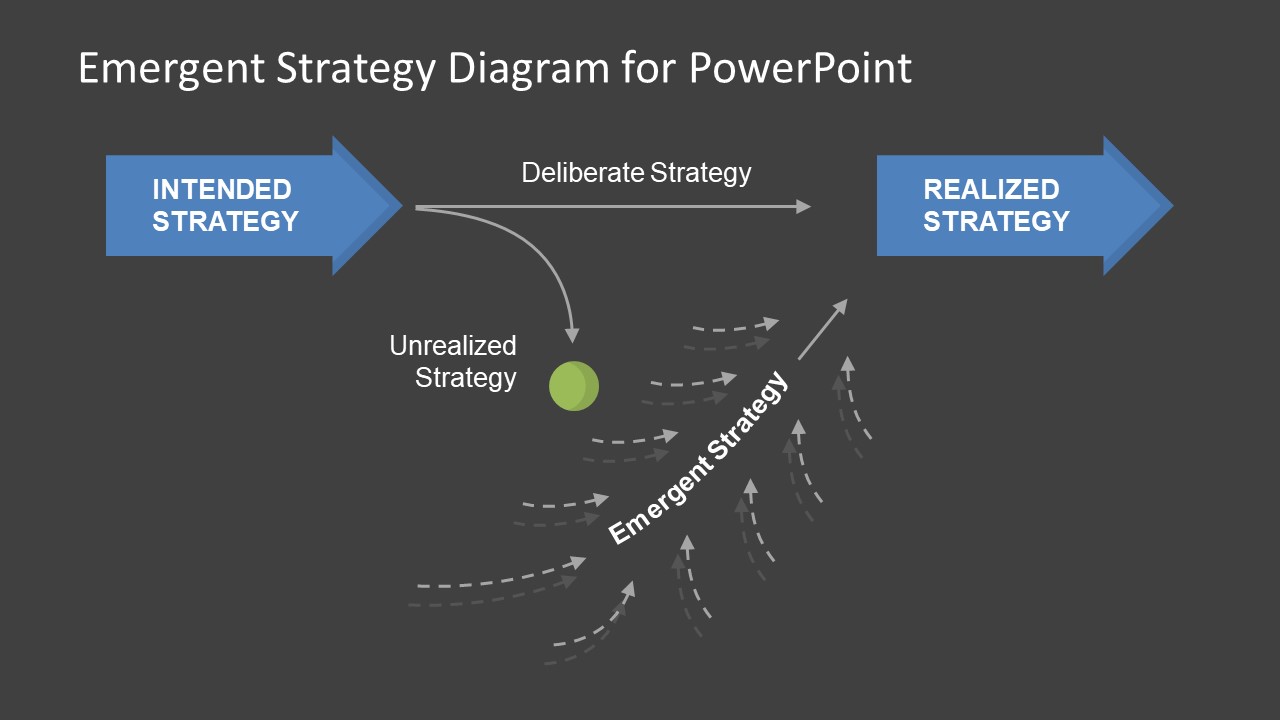
The Emergent Strategy PowerPoint Diagram is a presentation of a methodology for achieving goals. These can be the individual’s set of goals or an organization’s predetermined outcomes. The emergent strategy, however, is an unplanned approach to overcome the unexpected challenges and opportunities. The business strategy PowerPoint of emergent provides simple diagram designs. It has 4 slides to explain the intended, deliberate, and realized strategies as well. This PowerPoint has three unique diagram designs to display role of emergent strategy in intended-realized approach. The strategic plan of an organization basically comes from two directions. First, what business wants to execute (intended). And, the other one which arises due to unexpected risks and opportunities (emergent).
The Emergent Strategy PowerPoint Diagram is an editable template. The first diagram slide has an additional layout with the darker background color theme. Further, it contains a matrix style diagram showing how emergent can affect the smooth transition of realized strategy. It is a suitable strategy formulation method in PowerPoint for the management professionals. The last PowerPoint slide of business strategy template shows a precise diagram of the planning model. The illustration assists audience to grasp the main concept. Whereas, the presenter can deliver the changes of strategic plan as a part of the unrealized and emergent segment.
Recommended: Mintzberg PowerPoint templates
The PowerPoint diagram of emergent strategy is an organization’s business approach template. It is a response to environmental change or events. The diagram shows many design features of PowerPoint. These include the gradient and shadow effect. The shapes in PowerPoint are completely customizable. Therefore, users can change the colors of flat vectors and backgrounds. Moreover, the shapes are high-resolution images and users can rescale them to any size. With this emergent strategy PowerPoint template, a company can create and execute a plan with confidence. While the diagram demonstrates changes in the plan which can affect the organization over time.
What’s inside this template
Example presentation scenarios
- A strategy director can use the arrow-flow diagram to brief executives on why the realized strategy differs from the original intended strategy.
- A management consultant can use the matrix-style strategy field to show a client where deliberate planning ends and emergent response begins.
- A project manager can use the simplified grayscale flow model to explain which planned actions became unrealized strategy and which adaptive moves shaped the outcome.
- A business professor can use the dark-background diagram to teach Mintzberg strategy concepts with a clear contrast between deliberate strategy, emergent strategy, and realized strategy.
Features
- 100% editable presentation template
- Compatible with Microsoft PowerPoint and Google Slides
- 16:9 aspect ratio slides
- Scalable vector shapes, icons and illustrations
- AI-Ready for Microsoft Copilot and Claude
- Instant access and download
Frequently asked questions
Q: How should a presenter explain the emergent strategy message with these diagrams?
A: Start with the intended strategy arrow, then trace the deliberate strategy line toward the realized outcome. Pause at the unrealized branch to explain what did not continue, then introduce the dashed emergent arrows as market feedback, risks, or opportunities. This sequence helps the audience see adaptation as part of strategy, not as a planning failure.
Q: Who is this template best suited for in a business presentation?
A: This template fits strategy leaders, consultants, project managers, and instructors who need to explain why actual outcomes diverge from the original plan. It is especially useful in planning reviews, transformation discussions, and business education because the slides isolate intended, unrealized, emergent, deliberate, and realized strategy in one visual model.
Q: Why do the arrow and path metaphors work for emergent strategy?
A: The straight arrow represents deliberate planning, while curved branches and dashed paths show deviation, abandonment, and new inputs. That contrast makes the abstract idea of emergent strategy visible. The audience can compare the planned route with the final route and understand how unexpected events redirect strategic execution.




Emergent Strategy PowerPoint Diagram
4-slide presentation template for emergent strategy diagrams, intended strategy, and realized strategy paths
Emergent Strategy PowerPoint Diagram is a 4-slide diagram template for explaining how intended, deliberate, unrealized, emergent, and realized strategies relate. It includes arrow-flow diagrams, a matrix-style strategy field, and a simplified grayscale flow model for management, consulting, and planning presentations in Microsoft PowerPoint and Google Slides.
- Category
- Diagrams
- Rating

 Loading...
- Aspect ratio
- 16:9, 4:3
- Item ID
- 7800-01
- Colors
 Microsoft PowerPoint
 Microsoft Copilot
 Claude for PowerPoint
Other formats supported
Subscribe today and get immediate
access to download our PowerPoint templates.