Slide 2 of 2 from As-Is To-Be Diagram PowerPoint Template
Engaging As-Is To-Be Diagram Template
As-Is To-Be Diagram Overview
- Diagram
- Comparison Split
- Process Slide
- 16:9
- 100% Editable
The As-Is To-Be Diagram slide from the As-Is To-Be Diagram PowerPoint Template offers a clear visual comparison tool ideal for strategic planning and change management presentations. This slide template uses editable shapes and vector icons to depict current versus future states, facilitating effective communication in business presentations and performance improvement meetings.
What’s on This Slide
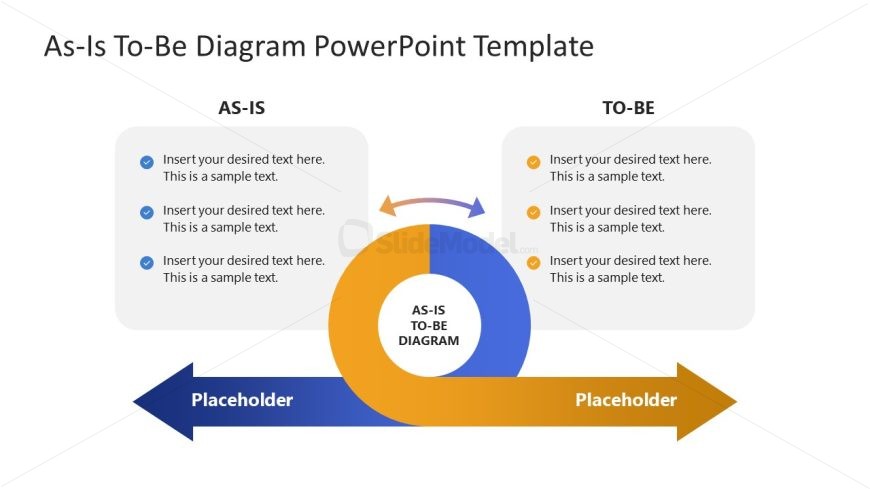
The layout features a central circular diagram labeled 'AS-IS TO-BE DIAGRAM' surrounded by two rectangular sections. The left section is labeled 'AS-IS' and contains three text placeholders aligned vertically, each with a checkmark icon. The right section is labeled 'TO-BE' and also contains three vertical text placeholders with a different icon. An arrow connects the two sections, indicating a flow from 'AS-IS' to 'TO-BE'. The background is primarily white, with blue and orange accents for the sections and icons.
How to Use It
This layout serves as a comparison tool to illustrate the transition from a current state to a desired future state. It fits well in presentations focused on change management, strategic planning, or performance improvement. This structure is useful for businesses to visualize processes, expectations, or product comparisons, helping stakeholders understand the benefits of proposed changes or enhancements.
Text Placeholders & Capacity
Keep your copy within these limits so it fits without resizing. Node body slots can accommodate about 10 words each.
| Placeholder | Count | Max characters (approx.) |
|---|---|---|
| Item body | 6 | 50 |
| Slide title | 1 | 30 |
Slide Keywords
Download unlimited PowerPoint templates, charts and graphics for your presentations with our annual plan.
DOWNLOADReturn to As-Is To-Be Diagram PowerPoint Template.