Slide 2 of 4 from Free Staffing Model Slide Template for PowerPoint
Free Staffing Model Slide Template
Staffing Model Process Slide
- Diagram
- Circular Cycle
- Process Slide
- 16:9
- 100% Editable
What’s on This Slide
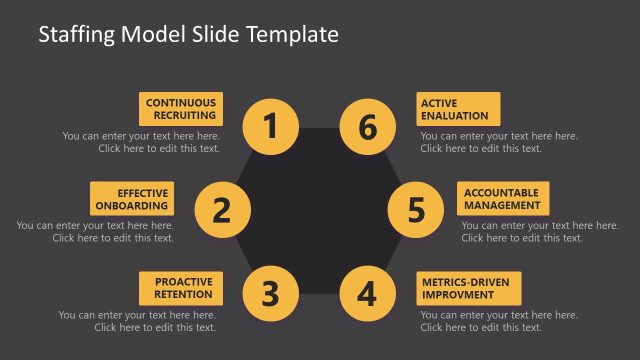
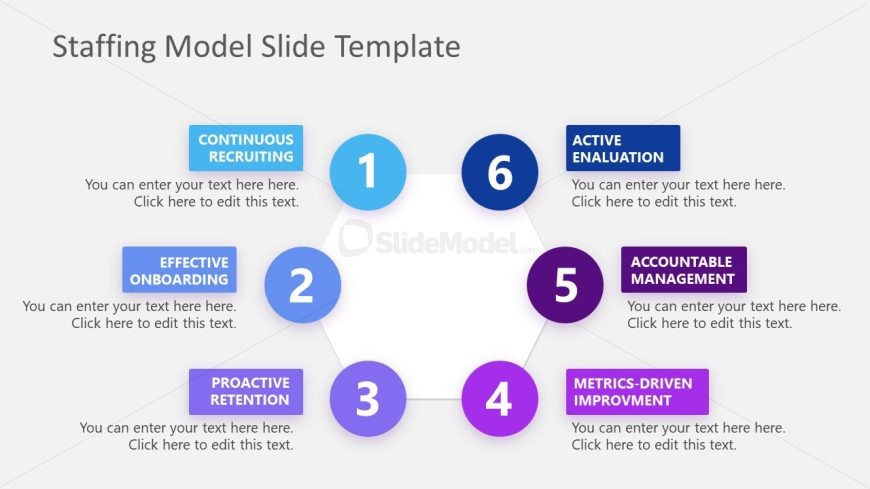
The layout features a central hexagon with six surrounding nodes arranged in a circular pattern. Each node contains a label, with the first node labeled 'Continuous Recruiting' at the top, followed by 'Effective Onboarding' on the left, 'Proactive Retention' below it, 'Metrics-Driven Improvement' on the bottom right, 'Accountable Management' on the bottom left, and 'Active Evaluation' at the top right. Text placeholders are present in each node, aligned centrally. The background is light gray, and the nodes are colored in shades of blue and purple, creating a clear visual hierarchy.
How to Use It
This layout serves as a process flow diagram, illustrating key components of a staffing model. It fits well after a problem framing slide and can be used to highlight steps in a recruitment strategy. This structure is useful for HR presentations, project planning, or any context where staffing processes need to be communicated clearly. It can also be adapted for workshops or training sessions focused on recruitment and retention strategies.
Text Placeholders & Capacity
Keep your copy within these limits so it fits without resizing. Node labels can hold about 30 characters each, while body text can accommodate around 50 characters.
| Placeholder | Count | Max characters (approx.) |
|---|---|---|
| Item heading | 6 | 30 |
| Item body | 6 | 50 |
Slide Keywords
Download unlimited PowerPoint templates, charts and graphics for your presentations with our annual plan.
DOWNLOADReturn to Free Staffing Model Slide Template for PowerPoint.