Slide 2 of 10 from Free Scope Presentation Template
Executive Summary Slide – Scope PPT Template
Executive Summary for Project Scope Statement
- Text Layout
- Single Statement
- Context Slide
- 16:9
- 100% Editable
What’s on This Slide
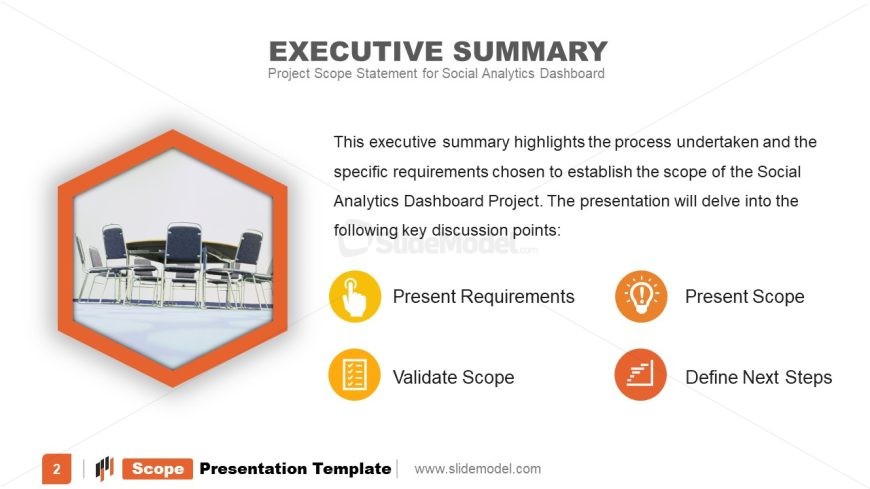
The layout features a hexagonal image placeholder positioned at the center left, showcasing a meeting space. To the right, a title is prominently displayed at the top, followed by a body paragraph that outlines the executive summary's purpose. Below the paragraph are four circular icons, each representing key discussion points, arranged in a horizontal line. Each icon is accompanied by a label. The background is light, with a subtle gradient, enhancing the visual hierarchy. The overall composition balances text and visuals, ensuring clarity.
How to Use It
This layout serves as an executive summary, summarizing key project aspects. It fits well after an introduction slide, providing a concise overview of the project's scope. This structure is useful in business scenarios such as project kick-offs, stakeholder presentations, or status updates, where summarizing critical information is essential. It effectively communicates main points while maintaining audience engagement, making it suitable for various project management contexts.
Text Placeholders & Capacity
Keep your copy within these limits so it fits without resizing. Body paragraph slots are tight, roughly 40-50 words each.
| Placeholder | Count | Max characters (approx.) |
|---|---|---|
| Slide title | 1 | 30 |
| Body paragraph | 1 | 300 |
| Item heading | 4 | 20 |
Slide Keywords
Download unlimited PowerPoint templates, charts and graphics for your presentations with our annual plan.
DOWNLOADReturn to Free Scope Presentation Template.