Built for slides
Flowchart Maker for PowerPoint
Write your steps or paste from ChatGPT. Get a clean flowchart in a presentation style, then take it into PowerPoint with every box and arrow still editable.
How to make a flowchart in PowerPoint
PowerPoint has two built-in ways to draw a flowchart: SmartArt, which can't branch or loop, and shapes joined by connectors, which you place and align one by one. Both work for five boxes and get slow after that. The fast way is to write the process here and download it as a slide. If you'd rather draw it by hand, our guide on how to make a flowchart walks through the symbols and the manual method.
Why make your flowchart here
- Real PowerPoint shapes, not a picture. Every box, label and arrow is a native shape you can click, retype and recolor.
- Arrows that stay attached. Move a box in PowerPoint and its arrows follow, with clean right-angle bends.
- Real decisions and loops. Yes and No branches, loops back and merges, which SmartArt can't draw.
- Tidy in one click. Shapes size to their text and the layout arranges itself. Drag anything when you want your own.
- Bring your ChatGPT flowchart, then check it. The flow check flags missing branches, dead ends and unlabeled exits before you present.
- Start without an account. Build, edit and restyle for free, with room for big processes.
- What you see is the slide you get. The preview and the downloads come from the same drawing.
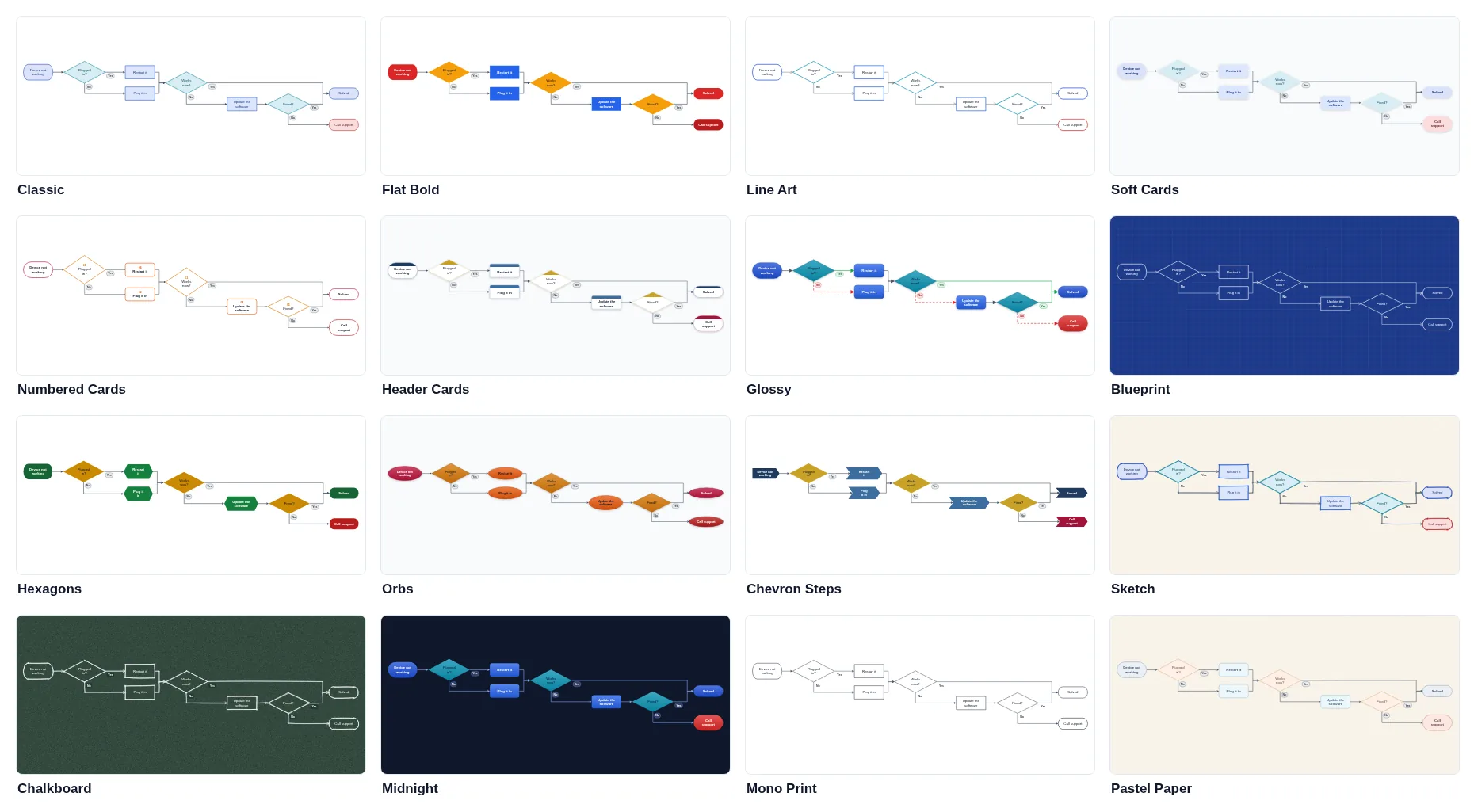
Sixteen styles, all made for slides
Start from classic flowchart symbols or switch to cards, hexagons, circles, chevron steps, a blueprint, a chalkboard or a hand-drawn sketch. Each style keeps the text readable on a 16:9 slide, and you can change its colors, arrows and background or roll the dice for a new look. Colors can also follow your PowerPoint theme, so the chart recolors with your template.
Turn Mermaid code into an editable PowerPoint flowchart
ChatGPT, Claude and many developer tools write flowcharts as Mermaid code. Paste it here and you get a real slide: shapes, labels and connected arrows you can edit in PowerPoint, not a picture. Subgraphs become labeled areas and Yes and No labels become branch tags. Need an image instead? Download it as a PNG or an SVG. Read more about Mermaid diagrams in PowerPoint.
Flowchart examples
Start from an example and make it yours: an order approval, a decision on a new idea, a manufacturing process, a hiring process, a troubleshooting guide, a sales process, an employee onboarding, a support ticket triage or a simple yes or no decision. Want a designed template instead? Get our free Yes/No Flowchart template or browse flowchart templates and process flow templates.
Flowchart, swimlane, data flow or decision tree?
A flowchart shows the order of steps and the decisions between them. When it matters who does each step, a swimlane diagram puts every team or role in its own lane: try the Swimlane Diagram Generator. A data flow diagram follows information between systems rather than steps in a process, and a decision tree lays out choices and their outcomes from left to right, like these decision tree templates.
Frequently asked questions
Can I edit the flowchart in PowerPoint?
Yes, with a Pro download. Every box is a native PowerPoint shape with its text inside, every label is a text box, and every arrow is a real PowerPoint connector. You can retype, recolor, resize and animate anything.
Do the arrows stay connected when I move shapes in PowerPoint?
Yes. The arrows are glued to the shapes they join, so when you drag a box in PowerPoint its arrows follow and re-route with right-angle bends, the same way connectors you draw yourself behave.
Can I paste a flowchart from ChatGPT?
Yes. Ask ChatGPT or Claude for a Mermaid flowchart and paste the answer as it is: the text around the code block is skipped. Decisions, Yes and No labels and subgraphs come through, and the flow check flags anything that is missing.
What do the flowchart symbols mean?
A rounded pill marks the start and the end, a rectangle is a step, a diamond is a decision with one arrow per answer, a slanted box is data going in or out, and a box with a wavy bottom is a document. Our guide on how to make a flowchart explains every symbol with examples.
What's the difference between a flowchart and a swimlane diagram?
A flowchart shows the order of steps and decisions. A swimlane diagram adds lanes for who does each step, such as a team, a role or a system. If ownership matters, use the Swimlane Diagram Generator; if the logic matters, a flowchart is clearer.
Can the colors follow my PowerPoint theme?
Yes. Under Colors and arrows, choose PowerPoint theme. The shapes are then written with your template's accent colors, so the chart recolors itself when you apply a different theme or paste it into your own deck.
Is it free?
Making, editing and styling a flowchart is free and needs no account. Downloading a PNG needs a free SlideModel account. PowerPoint, SVG and PDF downloads are part of SlideModel Pro.
Can AI make the flowchart for me?
Yes, with Pro. Describe the process in plain words, who does what and what gets decided, and the AI drafts an editable flowchart. The flow check then flags anything missing, such as a decision without a No branch. Each draft uses one credit, and you can undo it.
Can I move the shapes myself?
Yes. Drag any shape and its arrows re-route around it and stay attached, also in the PowerPoint file. Guides line it up with its neighbors, and Tidy up puts every moved shape back in the automatic layout.
Is my process uploaded?
No. Parsing, layout, drawing and downloads all run in your browser, and your chart is saved in this browser so a reload keeps it. Only an AI draft sends text to our server: the description you type for it.